

MKS Robin V2.4 конфигурация для дельты

Всем добра.
Это моя первая дельта, потому многое не понятно. Механика готова, осталось разобраться с конфигом.
Инфы по Робину крохи, кое что узнал только ТУТ
Но увы, кинематика не та.
По принтеру: драйвера TMC2208, шкивы 20 зубов 2мм, концевики оптические.
Значения в конфиге помеченные (+), мною изменены, с остальным не понятно.
Последний релиз MKS_ROBIN_V2.0.8 Release file
robin_config_En
#-------------------------------------------------------------############ Based Settings( Required) ########################machine type#0:xyz#1:corexy(x_motor = x+y, y_motor = x-y),#2:corexy(x_motor = x+y, y_motor = y-x),#3:delta>DRIVE_SYSTEM 3 (+) #machine type+>cfg_multiple_language 1 #multi-language(enable:1, disable:0)>cfg_language_type 4 (+) #languages setting,this configuration is valid when "cfg_multiple_language" is disabled. #(simplified Chinese:1; traditional Chinese:2; English:3; Russian:4; Spanish:5;French:6;Italian:7).+>cfg_ui_set_maxtemp 260 #Extrusion head display set maximum temperature, should not be greater than MAXTEMP value>cfg_ui_set_heated_bed_temp 120 #Set the maximum temperature of the hot plate display, which should not be greater than the value of HEATED_BED_MAX_TEMP>NUM_EXTRUDER 1 #number of extruder (1:singalЈ»2:dual)>HAVE_HEATED_BED 0 #1:enable bed; 0:disable bed>EXT0_TEMPSENSOR_TYPE 1 #1:100k thermistorЈ»102: MAX31855 thermocouple>EXT1_TEMPSENSOR_TYPE 1 #1:100k thermistorЈ»102: MAX31855 thermocouple>HEATED_BED_SENSOR_TYPE 1 #1:100k thermistorЈ»>FEATURE_TWO_XSTEPPER 0 #change E1 singal into X , then dual X is available(enable:1; disable: 0)>FEATURE_TWO_YSTEPPER 0 #change E1 singal into Y , then dual Y is available(enable:1; disable: 0)>FEATURE_TWO_ZSTEPPER 0 #change E1 singal into Z , then dual Z is available(enable:1; disable: 0)#---------------------------------------------------------------################# Machine settings ############################>EXT1_X_OFFSET 0 #E1 offset from the origin of X axis (mm)>EXT1_Y_OFFSET 0 #E1 offset from the origin of Y axis (mm)>INVERT_X_DIR 0 #X motor direction, 1 goes opposite direction;>INVERT_Y_DIR 0 #Y motor direction, 1 goes opposite direction; >INVERT_Z_DIR 0 #Z motor direction, 1 goes opposite direction; >EXT0_INVERSE 1 #E0motor direction, 1 goes opposite direction;>EXT1_INVERSE 0 #E1motor direction, 1 goes opposite direction;>XAXIS_STEPS_PER_MM 80 (+) #X steps per mm +>YAXIS_STEPS_PER_MM 80 (+) #Y steps per mm +>ZAXIS_STEPS_PER_MM 80 (+) #Z steps per mm +>EXT0_STEPS_PER_MM 100 #E0 steps per mm >EXT1_STEPS_PER_MM 100 #E1 steps per mm >X_MAX_LENGTH 200 #the MAX X-axis distance>Y_MAX_LENGTH 200 #the MAX Y-axis distance>Z_MAX_LENGTH 300 #the MAX Z-axis distance>X_MIN_POS 0 #the MIN X-axis distance>Y_MIN_POS 0 #the MIN Y-axis distance>Z_MIN_POS 0 #the MIN Z-axis distance>MIN_EXTRUDER_TEMP 175 #MIN TEMP on Extruder ,play a protective role>MAX_EXTRUDER_TEMP 275 #MAX TEMP on Extruder ,play a protective role>MAX_HEATED_BED_TEMP 150 #MAX TEMP on heated bed Ј¬play a protective role>HOMING_ORDER 1 #Set direction of endstops when homing; >X_HOME_DIR -1 #Homing direction(-1:MINЈ¬1:MAX)>Y_HOME_DIR -1 #Homing direction(-1:MINЈ¬1:MAX)>Z_HOME_DIR -1 #Homing direction(-1:MINЈ¬1:MAX)>HOMING_FEEDRATE_X 40 #the feedrate on X homing>HOMING_FEEDRATE_Y 40 #the feedrate on Y homing>HOMING_FEEDRATE_Z 10 #the feedrate on Z homing# 1 means endstop always-on,0 is always-off>ENDSTOP_X_MIN_INVERTING 1 >ENDSTOP_Y_MIN_INVERTING 1 >ENDSTOP_Z_MIN_INVERTING 1 >ENDSTOP_X_MAX_INVERTING 0 >ENDSTOP_Y_MAX_INVERTING 0 >ENDSTOP_Z_MAX_INVERTING 0 # 1 for Min/Max endstop enable in hardware,while 0 disable >MIN_HARDWARE_ENDSTOP_X 1 >MIN_HARDWARE_ENDSTOP_Y 1 >MIN_HARDWARE_ENDSTOP_Z 1 >MAX_HARDWARE_ENDSTOP_X 0 >MAX_HARDWARE_ENDSTOP_Y 0 >MAX_HARDWARE_ENDSTOP_Z 0 # 1 for Min/Max endstop enable in software,while 0 disable >min_software_endstop_x 0 >min_software_endstop_y 0 >min_software_endstop_z 0 >max_software_endstop_x 1 >max_software_endstop_y 1 >max_software_endstop_z 1 >MAX_FEEDRATE_X 120 (+) #the Max feedrate of X moving mm/s>MAX_FEEDRATE_Y 120 (+) #the Max feedrate of Y moving mm/s>MAX_FEEDRATE_Z 120 (+) #the Max feedrate of Z moving mm/s>MAX_FEEDRATE_EXT0 100 #the Max feedrate of E0 moving mm/s>MAX_FEEDRATE_EXT1 100 #the Max feedrate of E1 moving mm/s>MAX_ACCELERATION_UNITS_PER_SQ_SECOND_X 2000 (+) #the Max acculeration of X printing mm/s^2 >MAX_ACCELERATION_UNITS_PER_SQ_SECOND_Y 2000 (+) #the Max acculeration of Y printing mm/s^2 >MAX_ACCELERATION_UNITS_PER_SQ_SECOND_Z 2000 (+) #the Max acculeration of Z printing mm/s^2>MAX_ACCELERATION_EXT0 3000 #the Max acculeration of E0 printing mm/s^2>MAX_ACCELERATION_EXT1 3000 #the Max acculeration of E1 printing mm/s^2>MAX_TRAVEL_ACCELERATION_UNITS_PER_SQ_SECOND_X 1000 #MAX acceleration of X-axis moving mm/s^2 >MAX_TRAVEL_ACCELERATION_UNITS_PER_SQ_SECOND_Y 1000 #MAX acceleration of Y-axis moving mm/s^2>MAX_TRAVEL_ACCELERATION_UNITS_PER_SQ_SECOND_Z 200 #MAX acceleration of Z-axis moving mm/s^2#---------------------------------------------------------------################ Delta Settings ##############################>DELTA_MAX_RADIUS 135 #the radius of Delta annulus>PRINTER_RADIUS 197 #the distance from machine center to vertical top>DELTA_DIAGONAL_ROD 320 (+) #the length of Delta pole>DELTA_FLOOR_SAFETY_MARGIN_MM 15 #the safe distance of leveling edge>END_EFFECTOR_HORIZONTAL_OFFSET 28.0 #>CARRIAGE_HORIZONTAL_OFFSET 14.5 #>ROD_RADIUS 169 ##-------------------------------------------------------------################## Advanced Settings#############################>cfg_insert_det_module 0 #Assemble power outage module (1:mks 220det;0:mks pwc)>cfg_have_ups_device 0 # UPS(1:yes;0:no)>cfg_print_over_auto_close 0 # auto-off when print finishes(1:yesЈ»0:no)>cfg_filament_det_trigger_level 0 #the level signal of outage detection module (1:high level;0:low level)>cfg_filament_load_length 100 #the lenght to extrude filament (mm),Max:2000mm>cfg_filament_load_speed 800 #the speed to extrude filament(mm/min)>cfg_filament_load_limit_temperature 200 #It is the minimum temperature to extrude filament .>cfg_filament_unload_length 100 #the length to retract filament(mm),Max:2000mm>cfg_filament_unload_speed 800 #the speed to retract filament(mm/min)>cfg_filament_unload_limit_temperature 200 #It is the minimum temperature to retract filament .#-------------------------------------------------------------################# Bed Leveling ##############################Leveling mode settings>cfg_leveling_mode 0 #1:auto-leveling; 0:manual leveling########## Manual Leveling ##############manual leveling>cfg_point_number 5 #the point number of manual leveling(3,4,5 point available)#the 5 point location of manual leveling>cfg_point1:50,50>cfg_point2:180,50>cfg_point3:180,180>cfg_point4:50,180>cfg_point5:150,150########### Auto Leveling ##############>cfg_auto_leveling_cmd:G28;G32 S2; #the setting of auto-leveling command button>FEATURE_Z_PROBE 0 #0:disable levelingЈ¬1:enable leveling>BED_LEVELING_METHOD 1 #0:3 points leveling,1:more points leveling,2: 4 points leveling>Z_PROBE_ON_HIGH 1 #Probe signal(0: low level,always on; 1:high level,always off)>Z_PROBE_HEIGHT -0.8 #the height difference between Z-probe and nozzle>Z_PROBE_X1 -90 #coordinateX1 is preset point>Z_PROBE_Y1 -90 #coordinateY1 is preset point>Z_PROBE_X2 90 #coordinateX2 is preset point>Z_PROBE_Y2 -90 #coordinateY2 is preset point>Z_PROBE_X3 -90 #coordinateX3 is preset point>Z_PROBE_Y3 90 #coordinateY3 is preset point>cfg_leveling_z_speed 1500 #the speed of Z moving when manual leveling(mm/min)>cfg_leveling_xy_speed 3000 #the speed of XY moving when manual leveling (mm/min)>BED_LEVELING_GRID_SIZE 5 #leveling interval>Z_PROBE_SPEED 30 #the speed of Z-probe>Z_PROBE_XY_SPEED 100 #the speed of XY#---------------------------------------------------------------################# Wireless #####################################>cfg_wifi_mode:1 #wifi mode(0:sta;1:ap)>cfg_wifi_ap_name:MKS-WIFI #wifi name>cfg_wifi_key_code:19760907 #wifi password>cfg_cloud_enable:0 #0:disable cloud service 1:enable cloud service>cfg_wifi_cloud_host:www.baizhongyun.cn #cloud service adress>cfg_cloud_port:10086 #cloud service port#----------------------------------------------------------------############### Special Setup(default) ######################>STEPPER_HIGH_DELAY 0 #Pulse hold time setting(unit: us)#For inverting stepper enable pins>X_ENABLE_ON 0>Y_ENABLE_ON 0>Z_ENABLE_ON 0>EXT0_ENABLE_ON 0>EXT1_ENABLE_ON 0#Type of heat manager for this extruder.#- 0 = Simply switch on/off if temperature is reached.#- 1 = PID Temperature control.#- 3 = Dead-time control.>EXT0_HEAT_MANAGER 1 #>EXT1_HEAT_MANAGER 1 ##the PID setting of extruder>EXT0_PID_INTEGRAL_DRIVE_MAX 230 #the Max value of PID integral saturation >EXT0_PID_INTEGRAL_DRIVE_MIN 40 #the Min value of PID integral saturation>EXT0_PID_P 24 #the setting of P value>EXT0_PID_I 0.88 #the setting of I value>EXT0_PID_D 80 #the setting of D value>EXT1_PID_INTEGRAL_DRIVE_MAX 230 #the Max value of PID integral saturation >EXT1_PID_INTEGRAL_DRIVE_MIN 40 #the Min value of PID integral saturation>EXT1_PID_P 24 #the setting of P value>EXT1_PID_I 0.88 #the setting of I value>EXT1_PID_D 80 #the setting of D value#-------------------------------------------------------------####### Display Effect(refer to MKS TFT datasheet) ############user-defined function1 and 2>setmenu_func1_display 1 #1:display this buttonЈ¬0:no>setmenu_func2_display 0 #1:display this button; 0:not display#each command must be separated by semicolon ";" >setmenu_func1:M84;>setmenu_func2:M81;>moreitem_pic_cnt 0 #the number of "more" button #edit command for 1~7 "More" button#each command must be separated by semicolon ";"#each icon command must be less than 200 bytes>moreitem_button1_cmd:G28 X0;G28 Y0;G28 Z0;>moreitem_button2_cmd:G28 X0;G28 Y0;G28 Z0;>moreitem_button3_cmd:G28 X0;G28 Y0;G28 Z0;>moreitem_button4_cmd:G28 X0;G28 Y0;G28 Z0;>moreitem_button5_cmd:G28 X0;G28 Y0;G28 Z0;>moreitem_button6_cmd:G28 X0;G28 Y0;G28 Z0;>moreitem_button7_cmd:G28 X0;G28 Y0;G28 Z0;#the number of "more" button to dispaly on printing interface>morefunc_cnt:0#button1~button6 function >morefunc1_cmd:G28;>morefunc2_cmd:G28;>morefunc3_cmd:G28;>morefunc4_cmd:G28;>morefunc5_cmd:G28;>morefunc6_cmd:G28;#----------------------------------------------------------------############## Display Customization #######################>cfg_background_color 0x000000 #the color of screen background>cfg_title_color 0xFFFFFF #the color of title text>cfg_state_background_color 0x000000 #the color of temperature,fan,(etc)background >cfg_state_text_color 0xFFFFFF #the color of temprature,fan,(etc) text>cfg_filename_background_color 0x000000 #the color of file button>cfg_filename_color 0xFFFFFF #the color of file text>cfg_printingstat_word_background_color 0x000000 #the color of background in printing status>cfg_printingstat_word_color 0xFFFFFF #the color of text in printing status>cfg_BUTTON_3D_effects 0 #3D effects setting (disable: 0, enable: 1)
Размеры принтера: диаметр области печати 280мм, остальное на картинке
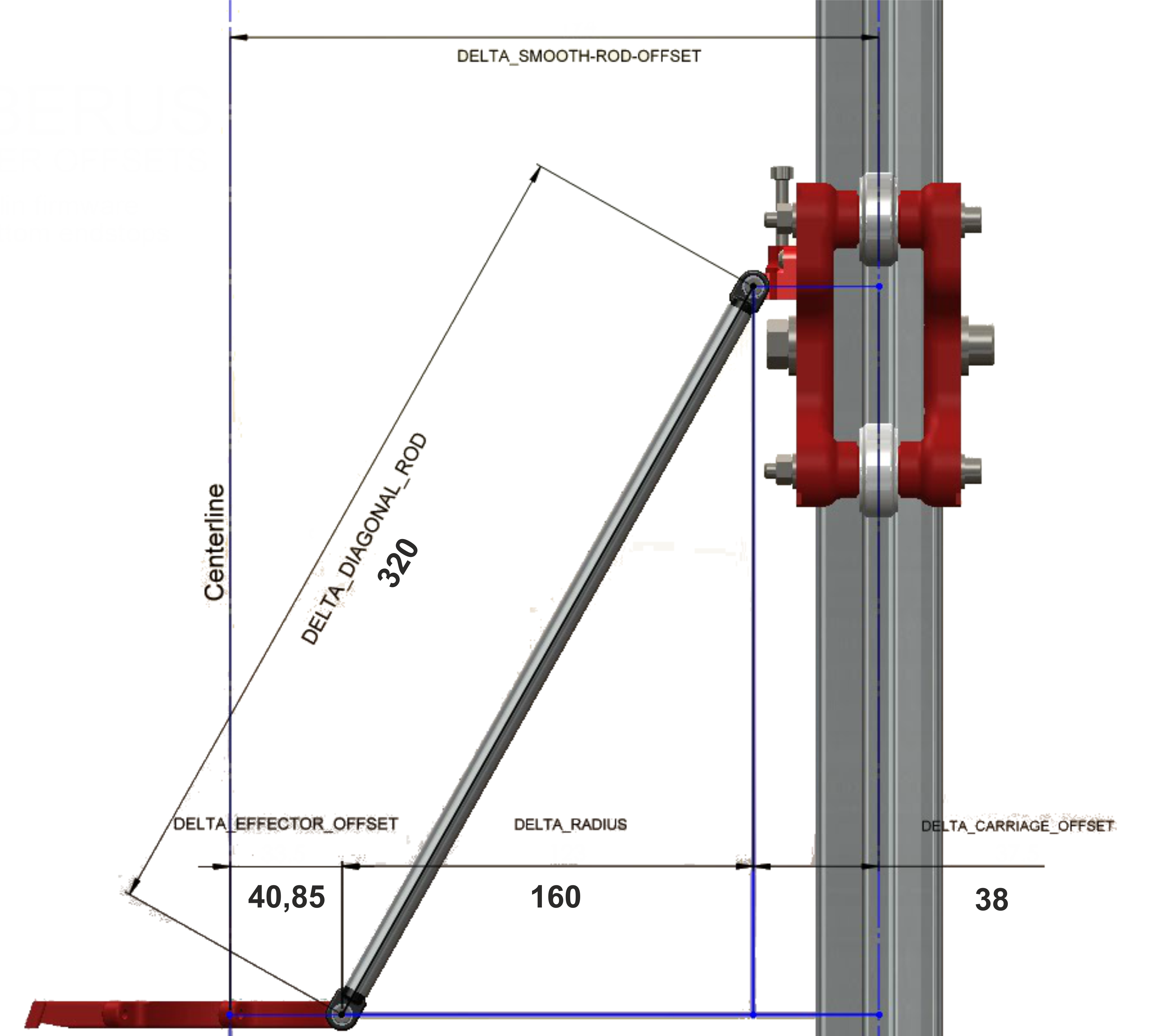
Помогайте, бртцы. За ранее спасибо.
Популярные вопросы
AnycubicSliser
Принтер на замену. Кто что посоветует?
Пришло время менять один из моих принтеров. В частности AD5m Pro. Сдох.
Кто что может посоветовать по зам...







Комментарии и вопросы
Да, две статьи по доработке эт...
К сожалению не подскажу наверн...
Так то конечно интересно, но.....
Мужики, быть может кто нибудь...
Купил Anycubic Mono 4. Пробую...
Всем добрый вечер!Господа може...
Здравствуйте. Помогите, пожалу...