

Marlin 2.0 Sbase LCD 2004

Всем привет.
Если кто уже подсоединял уже LCD к Sbase..подскажите схему подключения и что в прошивке..
Пытаюсь подключить дисплей... И все что-то не выходит.. Горит подсветка и при нажатии на энкодер, писк происходит, но текста не видно..контраст тут не причем.
Клеммы соеденил так, чтобы контакты сходились. А вот LCD7 -5 попробовал соеденить с J8 штырям (P1_22, P1_23, P2_12)...
Ничего не меняется..
Милости прошу к любым идеям :)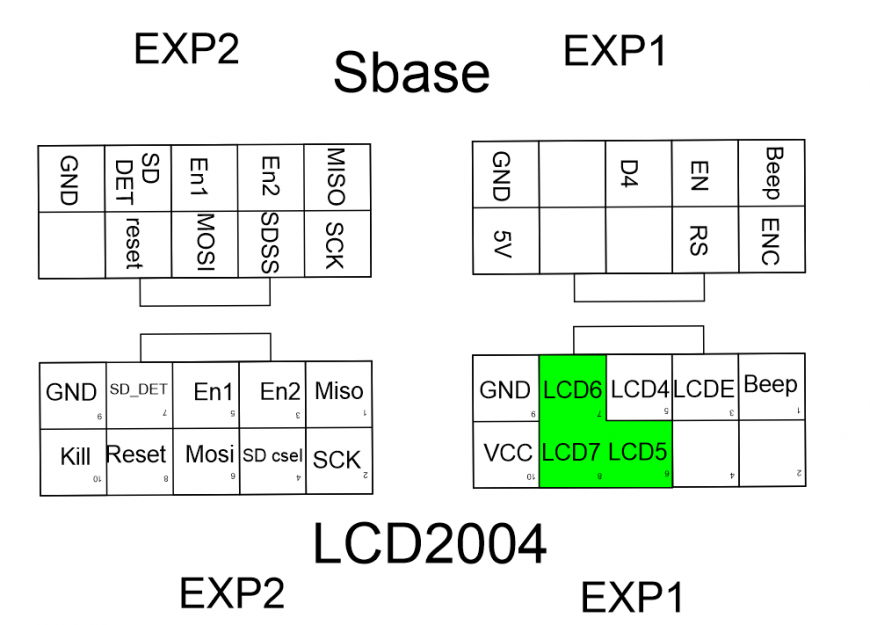 Прошивке расскоментированы #define REPRAP_DISCOUNT_SMART_CONTROLLER,
#define ULTRA_LCD, #define SDSUPPORT....
В пинах по разному пробовал, сейчас так:
//#define LPC_SD_CUSTOM_CABLE // Use a custom cable to access the SD
#define LPC_SD_LCD // Marlin uses the SD drive attached to the LCD
//#define LPC_SD_ONBOARD // Marlin uses the SD drive attached to the control board
#if ENABLED(LPC_SD_CUSTOM_CABLE)
/**
* A custom cable is needed. See the README file in the
* MarlinsrcconfigexamplesMksSbase directory
* P0.27 is on EXP2 and the on-board SD card's socket. That means it can't be
* used as the SD_DETECT for the LCD's SD card.
*
* The best solution is to use the custom cable to connect the LCD's SD_DETECT
* to a pin NOT on EXP2.
*
* If you can't find a pin to use for the LCD's SD_DETECT then comment out
* SD_DETECT_PIN entirely and remove that wire from the the custom cable.
*/
#define SD_DETECT_PIN P2_11 // J8-5 (moved from EXP2 P0.27)
#define SCK_PIN P1_22 // J8-2 (moved from EXP2 P0.7)
#define MISO_PIN P1_23 // J8-3 (moved from EXP2 P0.8)
#define MOSI_PIN P2_12 // J8-4 (moved from EXP2 P0.9)
#define SS_PIN P0_28 // Chip select for SD card used by Marlin
#define ONBOARD_SD_CS P0_06 // Chip select for 'System' SD card
#define LPC_SOFTWARE_SPI // With a custom cable we need software SPI because the
// selected pins are not on a hardware SPI controller
#elif ENABLED(LPC_SD_LCD)
// use standard cable and header, SPI and SD detect sre shared with on-board SD card
// hardware SPI is used for both SD cards. The detect pin is shred between the
// LCD and onboard SD readers so we disable it.
#define SCK_PIN P0_07
#define MISO_PIN P0_08
#define MOSI_PIN P0_09
#define SS_PIN P0_28 // Chip select for SD card used by Marlin
#define ONBOARD_SD_CS P0_06 // Chip select for 'System' SD card
#elif ENABLED(LPC_SD_ONBOARD)
// The external SD card is not used. Hardware SPI is used to access the card.
#if ENABLED(USB_SD_ONBOARD)
// When sharing the SD card with a PC we want the menu options to
// mount/unmount the card and refresh it. So we disable card detect.
#define SHARED_SD_CARD
#else
#define SD_DETECT_PIN P0_27
#endif
#define SCK_PIN P0_07
#define MISO_PIN P0_08
#define MOSI_PIN P0_09
#define SS_PIN P0_06 // Chip select for SD card used by Marlin
#define ONBOARD_SD_CS P0_06 // Chip select for 'System' SD card
#endif
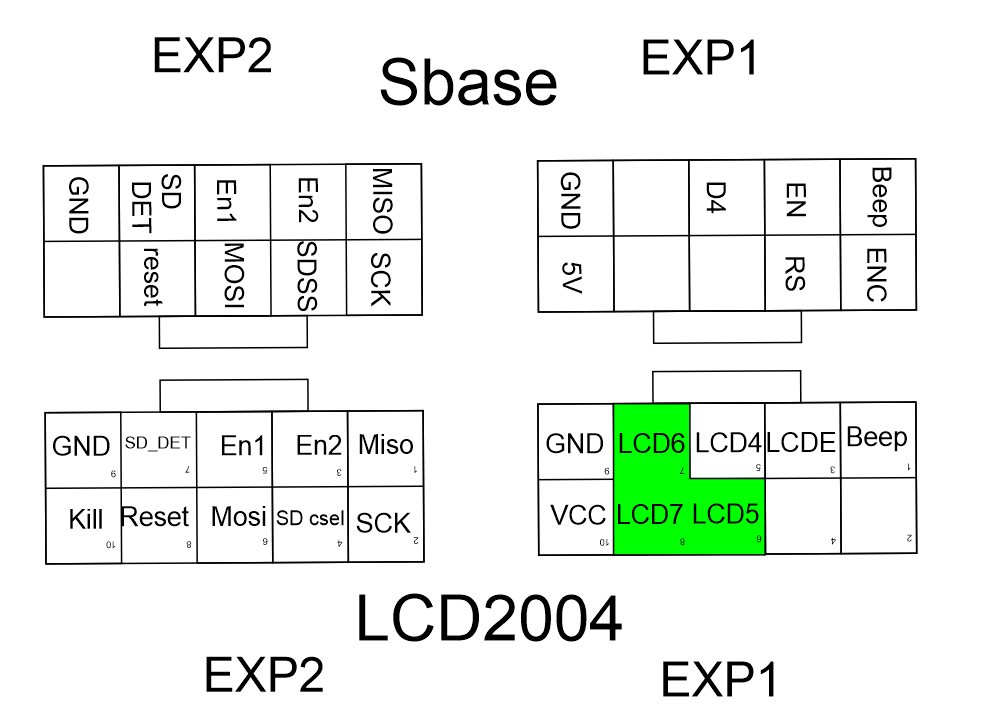
Если кто уже подсоединял уже LCD к Sbase..подскажите схему подключения и что в прошивке..
Пытаюсь подключить дисплей... И все что-то не выходит.. Горит подсветка и при нажатии на энкодер, писк происходит, но текста не видно..контраст тут не причем.
Клеммы соеденил так, чтобы контакты сходились. А вот LCD7 -5 попробовал соеденить с J8 штырям (P1_22, P1_23, P2_12)...
Ничего не меняется..
Милости прошу к любым идеям :)
#define ULTRA_LCD, #define SDSUPPORT....
В пинах по разному пробовал, сейчас так:
//#define LPC_SD_CUSTOM_CABLE // Use a custom cable to access the SD
#define LPC_SD_LCD // Marlin uses the SD drive attached to the LCD
//#define LPC_SD_ONBOARD // Marlin uses the SD drive attached to the control board
#if ENABLED(LPC_SD_CUSTOM_CABLE)
/**
* A custom cable is needed. See the README file in the
* MarlinsrcconfigexamplesMksSbase directory
* P0.27 is on EXP2 and the on-board SD card's socket. That means it can't be
* used as the SD_DETECT for the LCD's SD card.
*
* The best solution is to use the custom cable to connect the LCD's SD_DETECT
* to a pin NOT on EXP2.
*
* If you can't find a pin to use for the LCD's SD_DETECT then comment out
* SD_DETECT_PIN entirely and remove that wire from the the custom cable.
*/
#define SD_DETECT_PIN P2_11 // J8-5 (moved from EXP2 P0.27)
#define SCK_PIN P1_22 // J8-2 (moved from EXP2 P0.7)
#define MISO_PIN P1_23 // J8-3 (moved from EXP2 P0.8)
#define MOSI_PIN P2_12 // J8-4 (moved from EXP2 P0.9)
#define SS_PIN P0_28 // Chip select for SD card used by Marlin
#define ONBOARD_SD_CS P0_06 // Chip select for 'System' SD card
#define LPC_SOFTWARE_SPI // With a custom cable we need software SPI because the
// selected pins are not on a hardware SPI controller
#elif ENABLED(LPC_SD_LCD)
// use standard cable and header, SPI and SD detect sre shared with on-board SD card
// hardware SPI is used for both SD cards. The detect pin is shred between the
// LCD and onboard SD readers so we disable it.
#define SCK_PIN P0_07
#define MISO_PIN P0_08
#define MOSI_PIN P0_09
#define SS_PIN P0_28 // Chip select for SD card used by Marlin
#define ONBOARD_SD_CS P0_06 // Chip select for 'System' SD card
#elif ENABLED(LPC_SD_ONBOARD)
// The external SD card is not used. Hardware SPI is used to access the card.
#if ENABLED(USB_SD_ONBOARD)
// When sharing the SD card with a PC we want the menu options to
// mount/unmount the card and refresh it. So we disable card detect.
#define SHARED_SD_CARD
#else
#define SD_DETECT_PIN P0_27
#endif
#define SCK_PIN P0_07
#define MISO_PIN P0_08
#define MOSI_PIN P0_09
#define SS_PIN P0_06 // Chip select for SD card used by Marlin
#define ONBOARD_SD_CS P0_06 // Chip select for 'System' SD card
#endif
Популярные вопросы
Какой пластик лучше использовать?
Добрый день! Только начинаю печатать для личных нужд, не коммерческих, купил себе принтер "Creality K2 Combo". Подскажите, с чего начать? Каким пласти...
Замена роликов creality k1 max.
Возможно ли без снятия портала?
Кубик, Simplify3D и мосты
slic3r перед тем, как выкладывать верхние слои, кладет мосты, а прекрасный Simpli3D этого не делает :(
То есть вот это зелено...
То есть вот это зелено...







Комментарии и вопросы
У меня с этим замечательно спр...
Совсем другое дело, Евгений Ив...
Я изначально так и думал, что....
Имеется принтер, у которого 2...
Добрый день. Подскажи, что выб...
Добрый день. Подскажи, что выб...
Подключил принтер к симочному...